Game wise solitaire game Statistics window
Game-wise statistics window displays statistics for all games exists in the particular game package. To get this window first bring up the game statistics window from the statistics menu and then click on the game-wise tab. This window has two sections. In first section you can select a particular game and see statistics chart for that particular game.
There are two charts in this section. First is won/lost chart and second is score/moves/time chart. You can select any game from the drop down list and charts will be displayed accordingly.
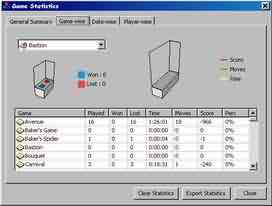
Second section of the window lists all games exists in the system and it's corresponding statistics like games played, won, lost, time, moves, score and winning percentage.
With this window you will get a more clear idea about overall game statistics. Number of games displayed will vary from package to package. In our solitaire game studio products like my freecell and my spider you will be able to see statistics for user created games too. These packages offer options for user to create new games with new game wizard and game editor. After creating a new game, you can play it in the game play area and then see statistics in game statistics window.
Again, this window shows statistics for all active players in the system. If you have created multiple players then you can see detailed player statistics at player-wise tab.