Select Game Window features, screenshot an details
When you click on Select Game Button on toolbar or Select Game menu item you will get select game window.
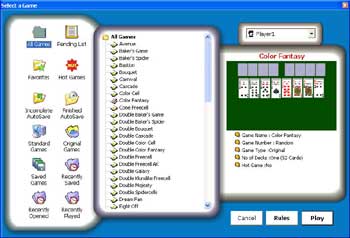
Select Game Window has following options
All Games
Pending List
Favorites
Hot Games List
Incomplete Autosave
Finished Autosave
Standard Games
Original Games
Saved Games
Recently Saved Games
Recently Opened Games
Recently Played Games
Just select a game according to the above options. Now click on the Player combo box if you want to change the current player. By default the selected player will be displayed. Either you can change it or leave it as it is. New game will be created for this player combo box selected player.
If you want to read rules for the currently selected game click on the rules button. This will show the rules in a small window. To Start the game either you can click on the Play button or double click on the game name.
If already a game is running in the play area then selecting a new game will close the current game and game engine will move the current game to lost games list. You can also exit from the Select game dialog with the Cancel button.