Selecting a game with a specific game number
To Select a particular game number click on Select a Number under File menu. This will open Select a Game Number Window.
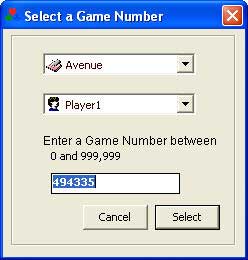
This window has 3 options.
Game Name : This combo box will list all games available in the package. You can select any game from the list. New game will be generated according to this selection. By default last played game name will be selected.
Player Name : You can also set a player from this window for the new game. Second combo box lists all active players exists in the game registry. Currently Selected Player will come as default option. You can either leave the current player as it is or select a new player. The new game will be generated with this selected player.
Game Number : This is most important selection in this window. You can select a game number in the textbox specified. You have to enter a valid number between the range show just above this textbox. By default there will be machine generated random game number. If you want you can leave that as it is then game engine will take this as input and start the game accordingly or you can enter a game number.
This valid range varies according to the selection in the options window. In options window you can select random range limit between 9 and 999 trillion. For example if 999 selected as the random range then you have to enter a number between 0 and 999 in this text box.
Starting the Game : Just select these 3 options and click on Select button. This will start a new game with the selected game name and player and the number entered in the game number text box. If you don't want to continue you can click on to cancel this Select Game Number Window.
Note: If you are in the middle of the game then selecting a new game with Select Game Window will close the current game and game engine will mark the current game as lost game.